
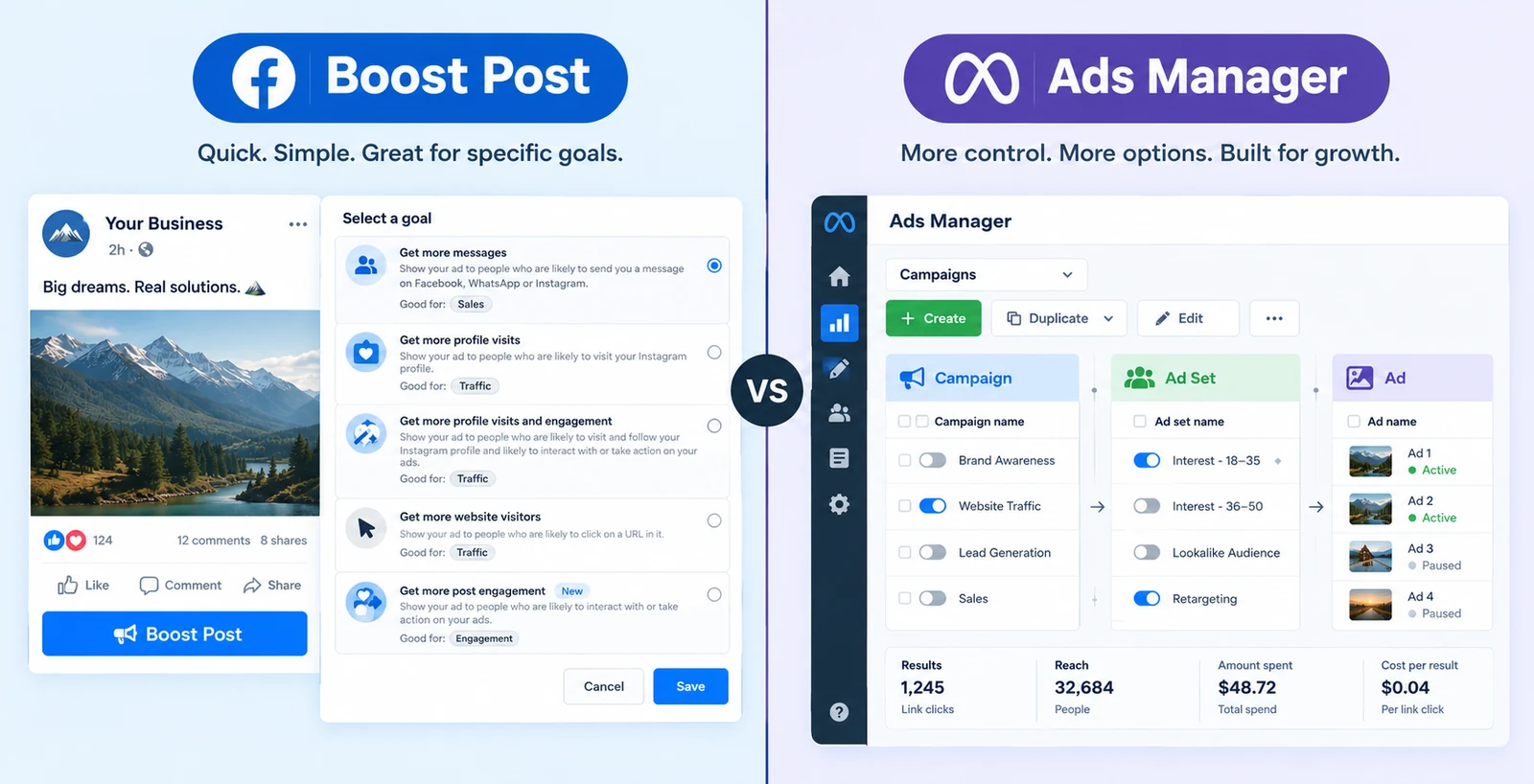
Every Meta advertiser hits this decision in the first five minutes: you post something, and Facebook puts a blue Boost Post button right under it. It’s tempting — three taps and you’re “running ads.” But that button and Meta Ads Manager aren’t two versions of the same thing. They’re built for different jobs, and using the wrong one is one of the most common ways small businesses quietly waste ad spend.
This guide breaks down exactly what separates them, where the Boost button actually lives, and when boosting is genuinely fine versus when it’s costing you money.
Quick answer: Boost Post is a simplified way to pay to extend the reach of an existing post, with basic targeting (age, gender, location, interests) and limited objectives (engagement, messages, website visits). Meta Ads Manager is the full advertising platform — it unlocks every ad format, sales/lead-gen objectives, custom and lookalike audiences, A/B testing, and real conversion tracking. Use Boost Post for quick visibility on proven organic content with small budgets; use Ads Manager for anything tied to leads, sales, or measurable ROI.
01. What Is Boost Post?
Boost Post (and its Instagram equivalent, Promote) turns an existing organic post into a paid ad in a few clicks, directly from the Page or post itself. You pick a basic goal — more engagement, more messages, more website visits — set an audience from a short list of options (location, age, gender, interests), set a budget and duration, and Meta starts showing that post to people beyond your followers.
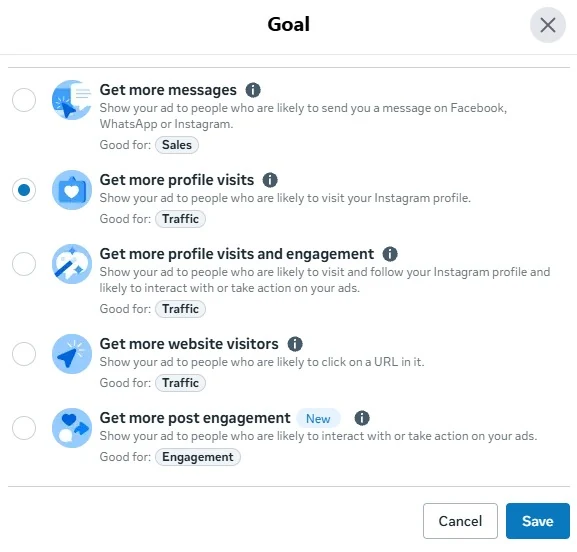
Look closely at the first option in that screenshot: “Get more messages” carries a “Good for: Sales” label. Worth being precise about what that actually means — it’s Meta’s use-case suggestion, not a real Sales objective. The underlying goal is still Messages, optimizing for message-starts, not purchases — there’s no Pixel-driven conversion optimization behind it the way there is with a genuine Sales objective in Ads Manager. Meta is just hinting that message conversations can lead to sales, not offering a sales-optimized campaign type.
It’s designed to be fast and low-friction, which is exactly why it’s the button most first-time advertisers hit first. Boosted posts start from as little as a few dollars a day, which makes them an easy way to test whether a post is worth putting real money behind at all.
The trade-off is control: you can’t change the creative once the post already exists, targeting is limited to broad demographic and interest categories, and the objectives on offer don’t include sales, leads, or website conversions — the outcomes most businesses actually care about.
One quick clarification, since it trips a lot of people up: Boost Post isn’t a separate product. It’s a feature you access from inside Meta Business Suite (Meta’s free, everyday hub for organic posting, inbox, and basic insights) or directly from a Page or post. There’s no standalone “Boost Post app” — when you tap that blue button, you’re using a stripped-down entry point into Meta’s ad system, one that skips the full campaign structure entirely in exchange for speed. If you’re weighing Business Suite against Ads Manager more broadly for day-to-day management, that’s a related but separate question from this one — this page is specifically about the boosting decision.
02. What Is Meta Ads Manager?
Ads Manager is Meta’s full advertising platform — the same tool professional media buyers use. Instead of starting from a post, you build a campaign from a three-tier structure: Campaign (objective) → Ad Set (audience, budget, placements) → Ad (the actual creative).
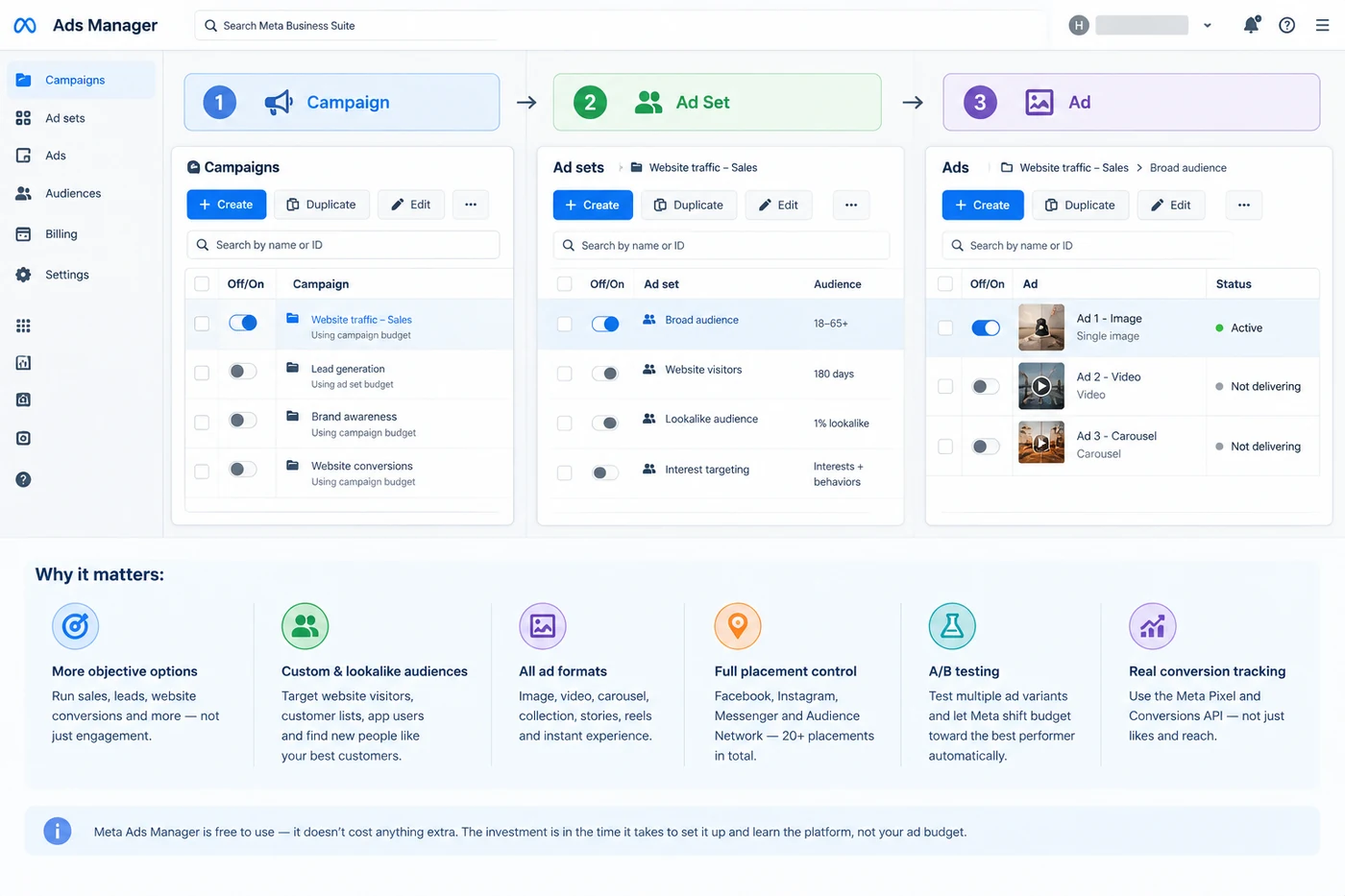
This structure is what unlocks everything Boost Post can’t do:
- Every campaign objective, including sales, leads, and website conversions — not just engagement and messages
- Custom audiences built from your website visitors, customer lists, or app users, plus lookalike audiences modeled on your best customers
- Every ad format — Single Image, Video, Carousel, Collection, Stories, Reels, and Instant Experience (see our full breakdown of every Meta ad format)
- Full placement control across Facebook, Instagram, Messenger, and Audience Network — more than 20 placements in total, versus a handful for boosted posts
- A/B testing with multiple ad variants per ad set, with budget automatically shifting toward whichever performs best
- Real conversion tracking through the Meta Pixel and Conversions API, not just surface metrics like likes and reach
Ads Manager doesn’t cost anything extra to use — it’s free, and it draws from the same ad budget. The cost is really in setup time and a steeper learning curve, not money.
03. Boost Post vs Ads Manager: Key Differences
| Boost Post | Ads Manager | |
|---|---|---|
| Objectives available | Engagement, messages, website visits, profile visits | All objectives, including sales, leads, and conversions |
| Targeting | Basic — location, age, gender, interests | Custom audiences, lookalikes, exclusions, detailed behavioral targeting |
| Ad formats | Whatever the original post already is | All formats — Image, Video, Carousel, Collection, Stories, Reels, Instant Experience |
| Placements | Limited (mainly Facebook and Instagram feeds) | 20+ placements across Facebook, Instagram, Messenger, Audience Network |
| Budget control | Simple daily/lifetime budget | Advantage+ Campaign Budget across ad sets |
| A/B testing | Not available — one post, one audience | Multiple ad variants per ad set, auto-optimized |
| Conversion tracking | Minimal — surface engagement metrics | Full Pixel/Conversions API tracking |
| Setup time | Under a minute | Minutes to hours, depending on campaign complexity |
| Best for | Quick visibility on proven organic content | Leads, sales, retargeting, anything measured on ROI |
04. When Boost Post Actually Makes Sense
Boost Post isn’t a bad tool — it’s a narrow one. It’s a legitimately good choice when:
- You’re extending the reach of a post that’s already performing well organically. If a post is already getting strong engagement, boosting it can be an efficient way to put money behind something proven rather than an unknown.
- Your goal really is engagement or brand visibility, not a measurable business outcome — announcing an event, building local awareness, or getting more eyes on a testimonial or behind-the-scenes post.
- The budget is genuinely small and the stakes of imprecise targeting are low — a few dollars a day to test whether an idea resonates at all.
Where it stops making sense: the moment you care about leads, sales, or return on ad spend. Boosted posts don’t give you the tracking to even know if that happened.
05. When You Need Ads Manager
Move to Ads Manager as soon as any of these are true:
- You want to generate leads or sales, not just engagement
- You want to retarget people who visited your site or engaged with you before
- You’re running more than one audience or creative variant and want to see what actually performs
- You need to track conversions with the Pixel or Conversions API to know what your ad spend is actually doing
- You want access to Carousel, Collection, Video, Stories, or Reels ad formats built specifically for the goal, not just whatever your original post happened to be
If you’re setting up a full campaign for the first time, our performance marketing campaign setup guide walks through campaign structure, tracking setup, and budgeting end to end.
06. How to Move a Winning Boosted Post Into Ads Manager
If a boosted post is genuinely performing — strong engagement, good comments, people asking where to buy — that’s a signal, not a finish line. Here’s how to carry that momentum into a real campaign instead of just re-boosting the same post indefinitely:
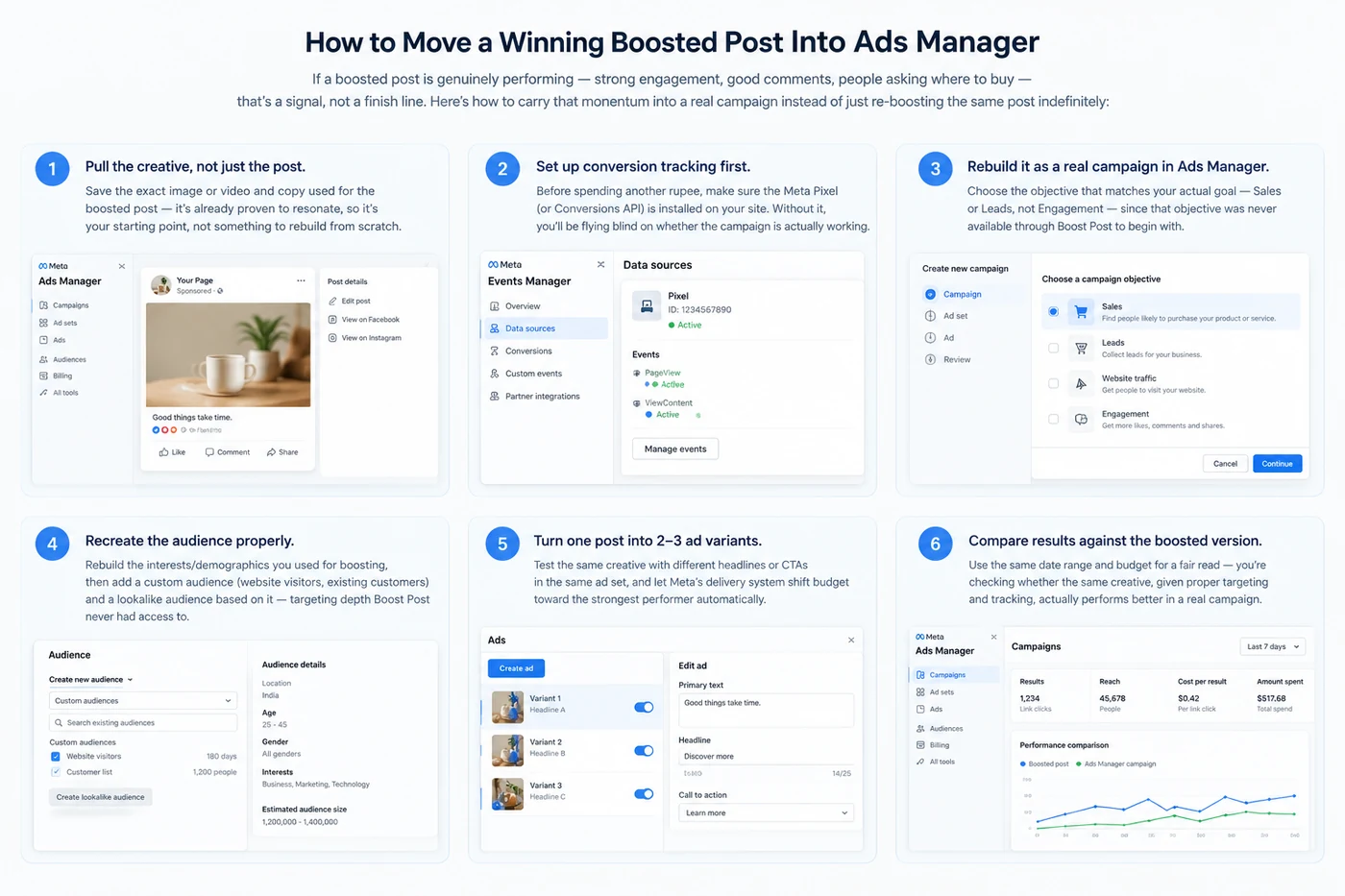
- Pull the creative, not just the post. Save the exact image or video and copy used in the boosted post — it’s already proven to resonate, so it’s your starting point, not something to rebuild from scratch.
- Set up conversion tracking first. Before spending another rupee, make sure the Meta Pixel (or Conversions API) is installed on your site. Without it, you’ll be flying blind on whether the campaign is actually working.
- Rebuild it as a real campaign in Ads Manager, choosing the objective that matches your actual goal — Sales or Leads, not Engagement — since that objective was never available through Boost Post to begin with.
- Recreate the audience properly. Rebuild the interests/demographics you used for boosting, then add a custom audience (website visitors, existing customers) and a lookalike audience based on it — targeting depth Boost Post never had access to.
- Turn one post into 2–3 ad variants. Test the same creative with different headlines or CTAs in the same ad set, and let Meta’s delivery system shift budget toward the strongest performer automatically.
- Compare results against the boosted version. Use the same date range and budget for a fair read — you’re checking whether the same creative, given proper targeting and tracking, actually performs better in a real campaign.
This is also the point where it’s worth checking which metrics actually matter for the objective you picked — engagement metrics that mattered for the boosted version usually aren’t the ones that matter once you’re optimizing for leads or sales.
07. Where Advantage+ Fits In
Meta has spent the last couple of years pushing more of Ads Manager itself toward automation — and as of February 2026, that automation is no longer optional in the way it used to be. Meta merged the separate “Manual” and “Advantage+” campaign creation paths into a single, unified flow: when you create a new campaign now, AI-driven optimization across audience, placements, and budget is switched on by default, with individual toggles available if you want to turn any one of them off. There’s no longer a fork where you explicitly pick “Advantage+” versus “manual” — Advantage+ is now simply how Ads Manager works, with manual control available as an override rather than a separate starting point. This shift is part of the same delivery-algorithm change we cover in Meta Andromeda Update Explained — Meta increasingly reads your ad creative itself to decide who sees it, rather than relying only on the audience settings you choose.
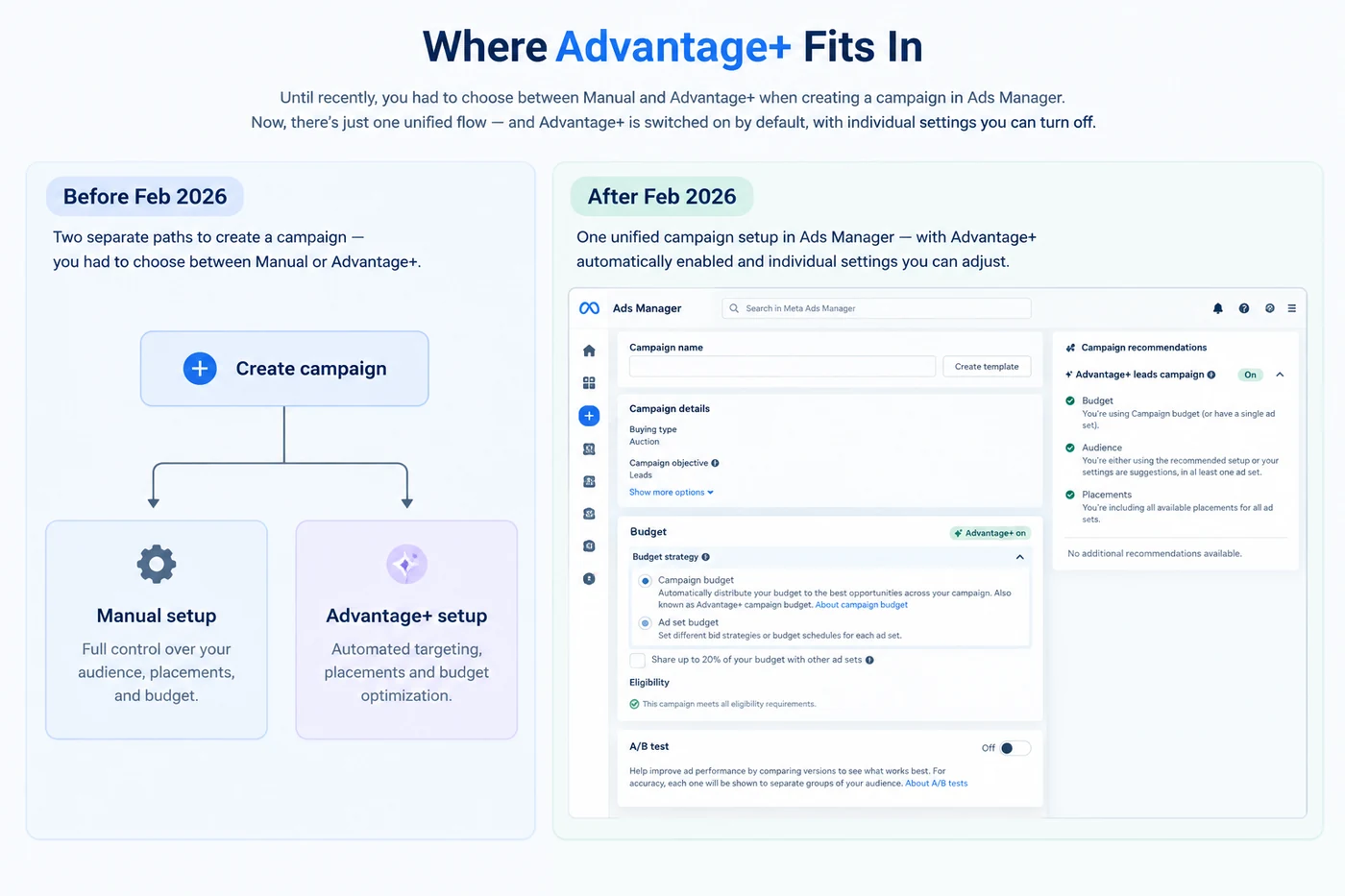
Two things are worth being precise about here, since the exact numbers get repeated a lot without context:
- Meta has reported that Advantage+ Shopping campaigns (renamed Advantage+ Sales campaigns in early 2025, now also covering Leads and App objectives) lowered cost per purchase and increased ROAS in internal testing — but that widely-cited 17%/32% figure comes from a 2022 internal study Meta ran, not a live, ongoing 2026 benchmark, so treat it as a directional data point rather than a number you should expect to replicate exactly.
- Even with Advantage+ automating targeting and budget by default, it still runs inside Ads Manager’s same Campaign → Ad Set → Ad structure — meaning you still get full format access, conversion tracking, and multiple ad variants that Boost Post simply doesn’t offer. Advantage+ automates the targeting decisions Ads Manager makes; it doesn’t turn Ads Manager into Boost Post.
In short: Advantage+ makes Ads Manager easier to run — and since February 2026, it’s the default way Ads Manager runs, not a separate mode you opt into. If ease-of-use was your reason for boosting, a default Advantage+ setup in Ads Manager is now an even more direct answer than the Boost button ever was.
Common Mistakes
- Running 100% of ad spend through the Boost button. It’s common — and it usually means plenty of likes and zero measurable sales, because there’s no conversion tracking to show otherwise.
- Boosting for a sales goal. Boost Post doesn’t offer a sales or conversion objective — if that’s the goal, the tool is already the wrong one, regardless of budget or creative quality.
- Assuming boosted engagement equals real interest. Reach and likes on a boosted post don’t tell you whether anyone converted — without the Pixel, that data doesn’t exist.
- Never graduating a winning post into Ads Manager. If a boosted post is performing, that’s a signal to rebuild it as a real campaign with proper targeting and tracking — not to keep boosting the same post indefinitely.
- Assuming Business Suite and Ads Manager are interchangeable. Business Suite’s ad options are just Boost Post under a different label — if you’re inside Business Suite looking for Carousel ads, custom audiences, or a sales objective, you’re in the wrong tool; click through to Ads Manager instead.
To understand what to actually track once you move to Ads Manager, our metrics guide (linked earlier and in Related Reading below) covers the conversion metrics Boost Post can’t give you.
FAQs
Is Boost Post the same as Facebook Ads?
Technically yes — a boosted post is a simplified type of Facebook ad. But it’s built on a much smaller feature set than a campaign created in Ads Manager: fewer objectives, basic targeting only, and no access to formats like Carousel or Collection.
Is boosting a post ever worth it?
Yes, for narrow use cases — extending reach on a post that’s already performing organically, building local brand awareness, or testing an idea with a very small budget before committing to a full campaign.
Why is my boosted post not converting?
Because Boost Post doesn’t support conversion-focused objectives or the detailed targeting needed to reach people likely to buy. If sales or leads are the goal, that objective needs to be built in Ads Manager from the start.
Does Ads Manager cost more than boosting?
No — Ads Manager itself is free to use and draws from the same ad budget. Some analyses have found boosted posts cost more per result than equivalent Ads Manager campaigns, since Ads Manager’s targeting and optimization tools generally produce more efficient delivery.
What is Advantage+ and does it replace Ads Manager?
Advantage+ is Ads Manager’s automated approach to targeting, placement, and budget decisions — and as of February 2026, it’s the default way new campaigns are created, not a separate campaign type you opt into. It doesn’t replace Ads Manager; it runs inside the same Campaign → Ad Set → Ad structure, with manual controls available as an override. Either way, you still get full format access, tracking, and reporting that Boost Post doesn’t offer.
Is Boost Post part of Meta Business Suite?
Yes — Boost Post isn’t a separate product. It’s a feature accessed from inside Meta Business Suite (or directly from a Page or post), acting as a simplified shortcut into Meta’s ad system that skips Ads Manager’s full campaign structure. (We cover the fuller Business Suite vs. Ads Manager comparison in a separate guide, since it’s really a different question from the boosting decision.)
How do I move a boosted post into Ads Manager?
Save the original creative, install the Meta Pixel if it isn’t already tracking conversions, then rebuild the post as a proper campaign — same creative, but with a real objective (Sales or Leads instead of Engagement), a custom or lookalike audience, and 2–3 ad variants for testing. See the full walkthrough above.
Should beginners start with Boost Post or Ads Manager?
If the goal is simply visibility on a proven post with a tiny budget, Boost Post is fine to start. If there’s any business outcome attached — leads, sales, sign-ups — start directly in Ads Manager, ideally using an Advantage+ campaign to keep setup simple while still getting full tracking.
Related reading
- Types of Meta Ads: Every Facebook & Instagram Ad Format Explained
- Meta Ads Metrics List — 100 Facebook Ads Metrics + Formulas
- Meta Andromeda Update Explained (2026)
- Performance Marketing Campaign Setup Guide 2026
- Best Meta Ads Courses 2026: Complete Training Guide
For a broader comparison of how boosted-post targeting stacks up against full ad campaigns across platforms, Hootsuite’s 2026 breakdown is a solid independent reference.
Not sure which approach fits your budget and goals?
At Harmukh Technologies, we set up and manage Meta campaigns for clients in India, the UAE, the UK, and Australia — from first campaign to full-funnel scaling. Get in touch for a free account audit, or explore our Meta Ads management service.